Architecture
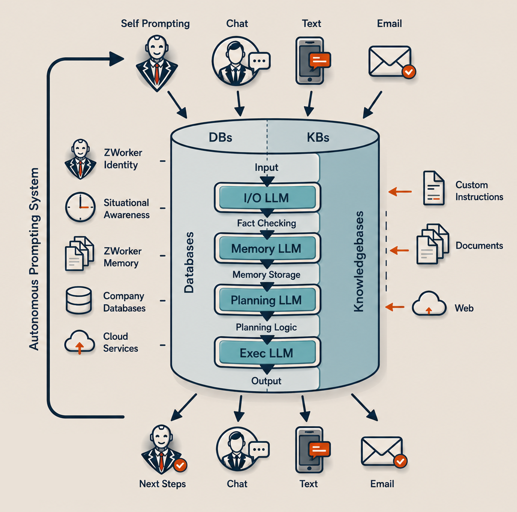 ZWorker is built as a complete operating system for small-business AI work.
It brings together the components agentic automation requires: memory, planning, tools, integrations, permissions, logging, error handling, email, database access, and human oversight.
Businesses can assemble those parts from automation platforms, scripts, cloud tools, and AI APIs. But then the system has to be built, connected, secured, monitored, and maintained.
ZWorker arrives with the architecture already in place.
The worker is not a chatbot with add-ons. It is an integrated system designed to understand the business, plan the work, execute the work, and remember the work.
Tell ZWorker what you want done. It plans it. It does it. It remembers.
What is ZWorker:
|
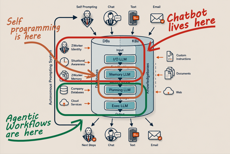
Watch this narrated two-minute slide deck explaining the difference between LLMs, chatbots, agentic workflow systems, and ZWorker.
Narrated by Betty 02b. |
LLM Subsystems
ZWorker uses multiple AI subsystems, each designed for a specific role. This gives the system more structure than a general chatbot and more control than a loose collection of automations.
Chat I/O
The main interface for ZWorker is conversation.
The Chat I/O subsystem handles the user-facing side of the system. It receives instructions, asks questions when needed, presents results, and keeps the experience clear for the person using ZWorker.
This is where the business owner, manager, employee, or consultant speaks to the system in plain language. The user does not need to know which model, database, task, tool, or subsystem is being used. Chat I/O handles the conversation and routes the work.
Memory
ZWorker’s proprietary memory system gives each worker more than continuity, a ZWorker has an identity, working memory, long-term experiential memory, and situational awareness. It can remember people, companies, prior tasks, documents, procedures, goals, decisions, and recurring patterns of work.
It does not simply save a transcript. It stores usable knowledge: facts, concepts, relationships, preferences, goals, procedures, and prior outcomes. That memory allows each ZWorker to become more useful inside the specific business where it works.
This is one of the primary differences between ZWorker and a chatbot. A chatbot has a session. ZWorker has a career.
Task Planning
Agentic workflow automation requires planning.
ZWorker can convert a business request into a structured Task Plan: a sequence of steps that can be reviewed, edited, and executed. A Task Plan is not just a prompt. It is an operational script that ZWorker can create, refine, and later run on behalf of the business.
Task Plans are available through the web interface. Users and consultants can read them, adjust them, approve them, and improve them over time.
This gives the business visibility into what the AI intends to do before it does it.
The Executive
The Executive is the autonomous execution subsystem.
It runs the Task Plans created by Task Planning. Each step can be configured for the amount of intelligence required. Some steps may use the full ZWorker identity and situational awareness. Some may use a smaller model for light summarization, classification, or language work. Some may use no AI at all and rely entirely on conventional software.
This matters. Not every task needs a large AI model. Not every step should be creative. Some steps require judgment. Others require precision. The Executive allows the system to use the right level of intelligence for each part of the process.
The result is automation that is more controlled, more efficient, and more appropriate for real business work.
Conventional Software Is Built In
ZWorker is not only an AI layer. It includes the robust conventional software infrastructure required to make AI useful in a business environment.
Email Account
Every ZWorker includes its own ZWorker.AI email account.
That account allows the worker to send and receive messages without requiring access to the owner’s personal Gmail, Outlook, or employee inboxes. If desired, the account can be routed to the organization’s own domain, so the worker appears as part of the company’s normal communications.
Incoming email can wake the system, provide context, trigger a task, or continue an existing conversation. When someone replies to a message sent by ZWorker, the system can reconstruct the relevant sending context, including the recent task history and the message that produced the reply.
Outgoing messages can also include a secure live-chat link with an expiring access key, allowing the recipient to continue the conversation directly with the ZWorker when appropriate.
Universal API Connector
The working core of ZWorker is its Universal API Connector.
An API is a structured way for software systems to communicate with each other. Most modern cloud platforms, CRMs, accounting systems, scheduling tools, databases, and business applications expose some form of API.
ZWorker can use those connections inside tasks. REST APIs, XML APIs, SQL databases, cloud systems, and internal business tools can be made available to a ZWorker as controlled capabilities. Once connected, those capabilities can be used in chat, in task execution, or as part of repeatable workflows.
But the Universal API Connector is not limited to pre-built integrations.
When a business needs a new connection, ZWorker can create it. Given human-readable API documentation, a Postman collection, or a clear technical description of the service, and ZWorker can interpret the available endpoints, define the required inputs and outputs, and build controlled tools for that system.
Those tools can then be tested, approved, and used inside real business workflows.
This is what makes the connector truely universal. ZWorker is not waiting for a software vendor to publish an integration, and the business is not limited to a fixed marketplace of pre-built apps. If the system exposes an API, ZWorker can be taught how to use it.
That is what allows ZWorker to move beyond chat and into real business action.
Workspace DB
Every ZWorker organization receives a private Workspace Database. It is separate to the organization and available to its ZWorkers for operational use.
The Workspace DB can hold lists, records, inputs, outputs, intermediate results, task data, imported information, and structured working tables. ZWorker can create tables, add fields, write queries, store results, retrieve records, and use the database during task execution.
This gives the system a practical working surface between AI and business operations.
The Executive can read from the Workspace DB, write to it, update it, summarize it, or use it as a staging area for more complex work. A user can also interact with it through Chat I/O, asking questions or giving instructions in plain language.
Beyond ZWorker's memory, the Workspace DB provides true operational data management.
Built for Small-Business Operations
ZWorker’s architecture is designed for the practical needs of small businesses.
It combines AI reasoning with conventional software controls. It gives each worker memory, task planning, execution, email, API access, database storage, logging, and human oversight. It is structured enough to be reliable, but flexible enough to adapt to the way each business actually works.
Most agentic workflow systems begin as a construction project.
ZWorker begins as an operating entity. The parts are already present. The system is already integrated. The worker is ready to be configured for the business.
Tell it what you want done. It plans it. It does it. It remembers.